

GTA VI / GUIDEDISTRICT
GTA 6 preload: times and steps for PS5 and Xbox
On this page
Rockstar schedules GTA 6 preloading for November 10, 2026: midnight in your local time zone on PS5, and 00:00 GMT worldwide on Xbox Series X|S. Check your console’s download queue to see whether the transfer has actually started. Preloading prepares the installation before the November 19 release; it does not unlock early play.
Find your launch times
All times in the row’s time zone. This is the announced schedule, not a live availability check. Compare it with the countdown for your purchase in the console store. Your language does not determine your account region.
| Time zone | PS5 · Preload | Xbox · Preload | Rockstar release rule | PS Store US / Canada display |
|---|---|---|---|---|
| TorontoAmerica/Toronto | November 10 · 00:00 EST | November 9 · 19:00 EST | November 19 · 00:00 EST | November 19 · 00:00 EST |
| Los AngelesAmerica/Los_Angeles | November 10 · 00:00 PST | November 9 · 16:00 PST | November 19 · 00:00 PST | November 18 · 21:00 PST |
| ParisEurope/Paris | November 10 · 00:00 CET | November 10 · 01:00 CET | November 19 · 00:00 CET | November 19 · 06:00 CET |
| BerlinEurope/Berlin | November 10 · 00:00 CET | November 10 · 01:00 CET | November 19 · 00:00 CET | November 19 · 06:00 CET |
| LondonEurope/London | November 10 · 00:00 GMT | November 10 · 00:00 GMT | November 19 · 00:00 GMT | November 19 · 05:00 GMT |
| São PauloAmerica/Sao_Paulo | November 10 · 00:00 -03 | November 9 · 21:00 -03 | November 19 · 00:00 -03 | November 19 · 02:00 -03 |
| TokyoAsia/Tokyo | November 10 · 00:00 JST | November 10 · 09:00 JST | November 19 · 00:00 JST | November 19 · 14:00 JST |
| SydneyAustralia/Sydney | November 10 · 00:00 AEDT | November 10 · 11:00 AEDT | November 19 · 00:00 AEDT | November 19 · 16:00 AEDT |
Check the right clock
The two platforms use different schedules. For Xbox players in Toronto, 00:00 GMT on November 10 is 7 p.m. EST on November 9. In Paris it is 1 a.m. on November 10. These are conversions of one worldwide opening, not different release dates.
PS5 uses local midnight instead. Do not apply the Xbox conversion to a PlayStation pre-order. Keep the release date separate from this download appointment.
The table shows Rockstar’s announced opening times, not a live report of your console. Reaching the scheduled hour and completing an installation are separate steps. Check the queue before retrying or changing settings.
PS5: set up the automatic download
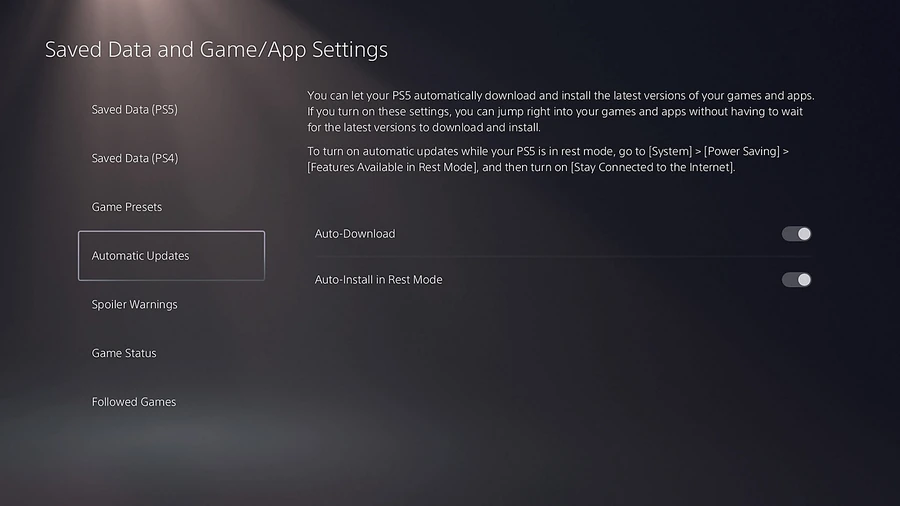
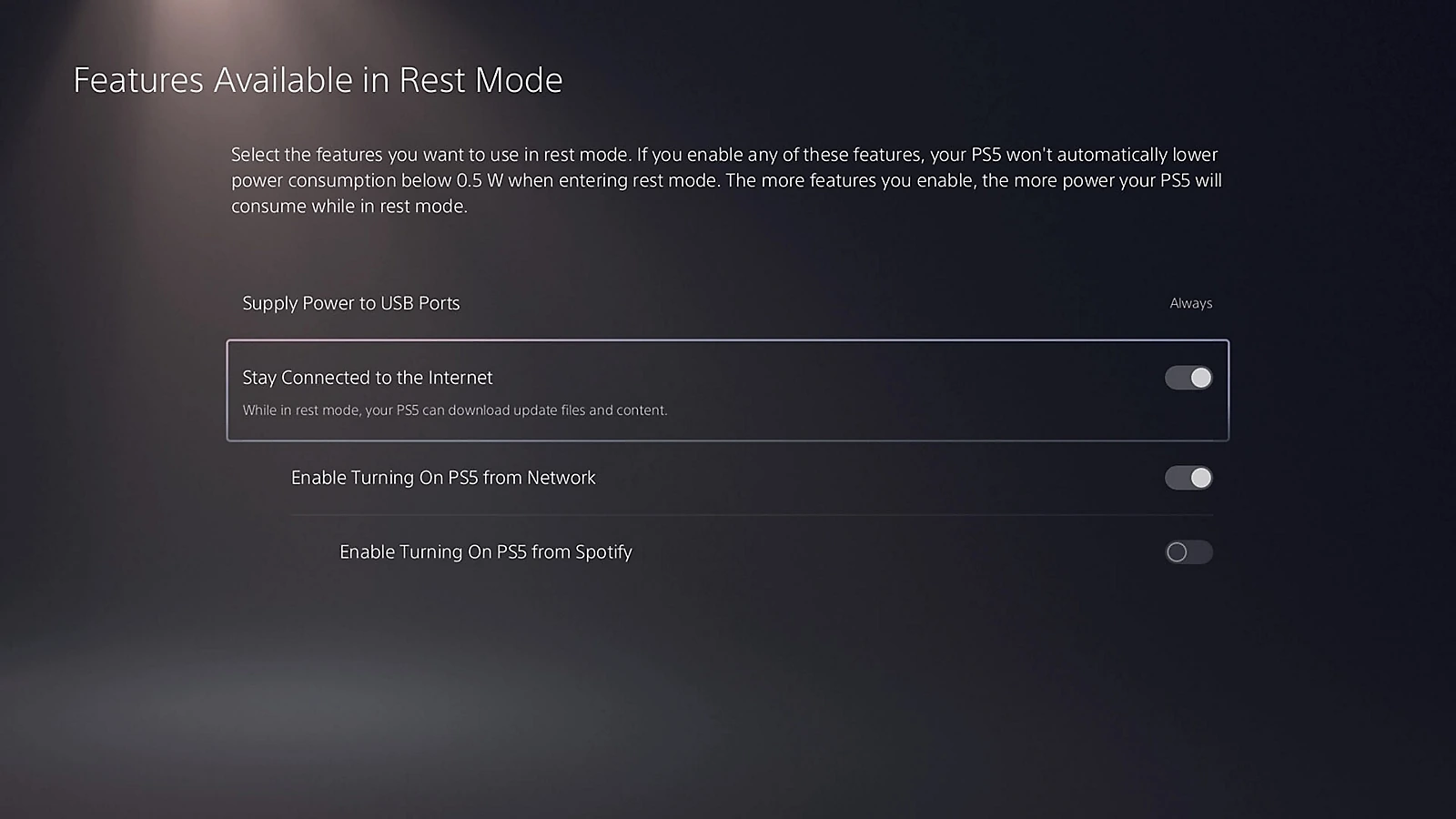
For a digital preorder, select the game’s content for automatic download. If you use Rest Mode, also keep the internet connection active. The two paths below show both checks.
Select the preorder
Check The box beside the game content must be selected. Confirm with OK.
Keep internet in Rest Mode
Check Turn on Stay Connected to the Internet.
With both checks complete, the selected game content can auto-download at the announced opening while the PS5 stays on or in Rest Mode with internet access. Confirm progress in the queue; downloading does not unlock early play.
Prepare the console
On PS5, open your pre-ordered game in Game Library, select its countdown and check the automatic-download selection. For downloads in Rest Mode, keep the console connected to the internet. Rockstar advises automatic updates and an Xbox that is on or in Sleep mode.
Before leaving the console, check that you are using the account associated with the purchase and that the game appears in its library. A receipt and an empty download queue answer different questions: the first confirms the purchase, while the second shows what is actually downloading.
Allow time and free space
Rockstar lists up to 212 GB of free space depending on the device. That is a storage requirement, not a guaranteed network transfer size. Use the amount displayed by your console in the download calculator.
If preload does not start
Has preload opened?
PS5: local midnight on November 10, 2026. Xbox: 00:00 GMT that day, which is November 9 at 19:00 in Toronto.
No → action Wait for your platform’s opening. Compare the schedule above with your store countdown.
Yes → next Check the account and edition at point 2.
Is the full game in this account?
Check the purchasing account, successful preorder and the full game itself. Ultimate Edition Upgrade is an add-on, not the base game; a boxed download code must first be redeemed.
No → action Check the order, edition and any code redemption. Use the account that owns the game.
Yes → next Check storage at point 3.
Is there enough free space?
Rockstar lists up to 212 GB depending on the console. Compare free storage with the requirement shown on your console.
No → action Follow the storage guide to make room while protecting saves. Storage required is not the transfer size.
Yes → next Check the download queue at point 4.
Is the download progressing?
Read the queue’s actual state: no entry, paused transfer, error, or completed installation waiting for release. Automatic settings do not prove a transfer has begun.
No → action On PS5, pause then resume a listed download. If nothing is listed, recheck the game’s auto-download selection and Rest Mode internet setting above. For an error, keep its code and use the official platform help below.
Yes → next Let it finish. If installation is complete but the game is locked, check the unlock time.
If support is needed, keep your platform, account region, game/edition, exact error code and attempt time with its time zone. Keep the order number private. A download problem alone is no reason to buy the game again.
Sources and platform help: Rockstar · PlayStation 5 · Xbox Series X|S
Read the download state before retrying
| What you see | What to check next |
|---|---|
| No GTA VI download in the queue | Confirm the purchasing account and the full game’s preorder status. On PS5, check the content selection in the countdown. On Xbox, check automatic updates and leave the console on or in Sleep mode. |
| A paused download or an error | On PS5, try Pause then Resume in Downloads/Uploads. If the error remains, keep its exact code and use the platform help below. Do not cancel a large transfer as your first step. |
| Installed, but locked or counting down | The files may be ready before the game unlocks. Compare the unlock time and account entitlement; downloading again does not bring release forward. |
Sources
- Rockstar Support — GTA VI pre-load FAQ
- PlayStation Support — pre-orders and automatic downloads
- PlayStation Support — automatic downloads and updates
- Rockstar Support — GTA VI installation requirements
- Rockstar — regional pre-load and release times
- PlayStation Support — download troubleshooting
- Xbox Support — installation troubleshooting
- Rockstar Support — platforms, editions and versions