

GTA VI / GUIDEDISTRICT
Save places and notes
On this page
A favourite helps you find a place again; a note explains why it matters to you. Your private pins cover ideas that do not have their own catalogue entry. All three belong to the current local profile.
Separate favourites from checkmarks
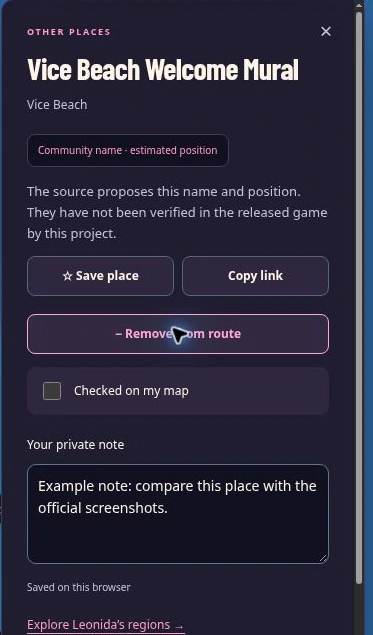
Open a place and choose ☆ Save place. It becomes ★ Saved and appears when Saved only is enabled, provided your other filters also match. For example, star Lake Leonida as a card to compare later. Unstarring it removes the favourite without deleting its note or removing it from your route.
Checked on my map serves a different purpose: you decide what a completed check means. It could mean that you have reviewed the source. It is not verified game completion. Undo last check reverses your most recent check action in the current session.
Write a note you can act on
Under Your private note, use a specific reminder such as “Compare the east shore with the linked image; position still uncertain”. Notes save as you type when browser storage is available. The field allows up to 2,000 characters. Clearing its text removes that note.
Look for Saved on this browser. If the status instead says the change was not saved, download a backup before leaving the page. Refreshing first could lose text that exists only in memory. There is no cloud copy or automatic transfer to another device.
Make a place for your own idea
Choose + Private pin, then click or tap inside the map and give the point a clear name, such as “Compare these two shore shapes”. Confirm with Add pin. Its card supports a note, favourite, checkmark and route stop just like other entries. This is your annotation, not a submitted catalogue correction.
Delete this private pin… asks for confirmation. Deleting it also removes its associated note, favourite, checkmark and route entry from this profile. Export first if you might want that annotation later. To stop placing a pin without creating one, use Cancel.
Share a place without sharing your notebook
Copy link on a public place card shares that place’s address, not your private note, favourites or checkmarks. Private pins do not have this public-link button. Backups are different: their files include your private content, so check what they contain before giving them to someone.
In My progress, use + to create a separate profile for another project. Switching profiles changes the notebook you see; it does not delete the other one. Give profiles distinct names and export each one separately.