

GTA VI / GUIDEDISTRICT
Plan your route
On this page
A route is an ordered set of places in your map profile. Use it for a short review session or a list to revisit later. It connects your choices with straight lines and does not calculate a driving itinerary.
Build a small route first
Open the map, find Lake Leonida and choose + Add to route on its card. Repeat with Ambrosia Raceway Park and another place you want to inspect. Open My route to see the stops in the order you added them. A private pin can be a stop too.
Start with three or four places so the list stays easy to review. You do not need to star a place first: route membership and favourites are independent. The card button changes to − Remove from route once that place is included, so selecting it again removes the stop.
Choose your own order
Use ↑ Up and ↓ Down beside a stop to move it one position. The numbers on the route update with the list. For example, put the card you want to compare first above the others, even if it is farther away. No automatic optimisation rearranges your choices.
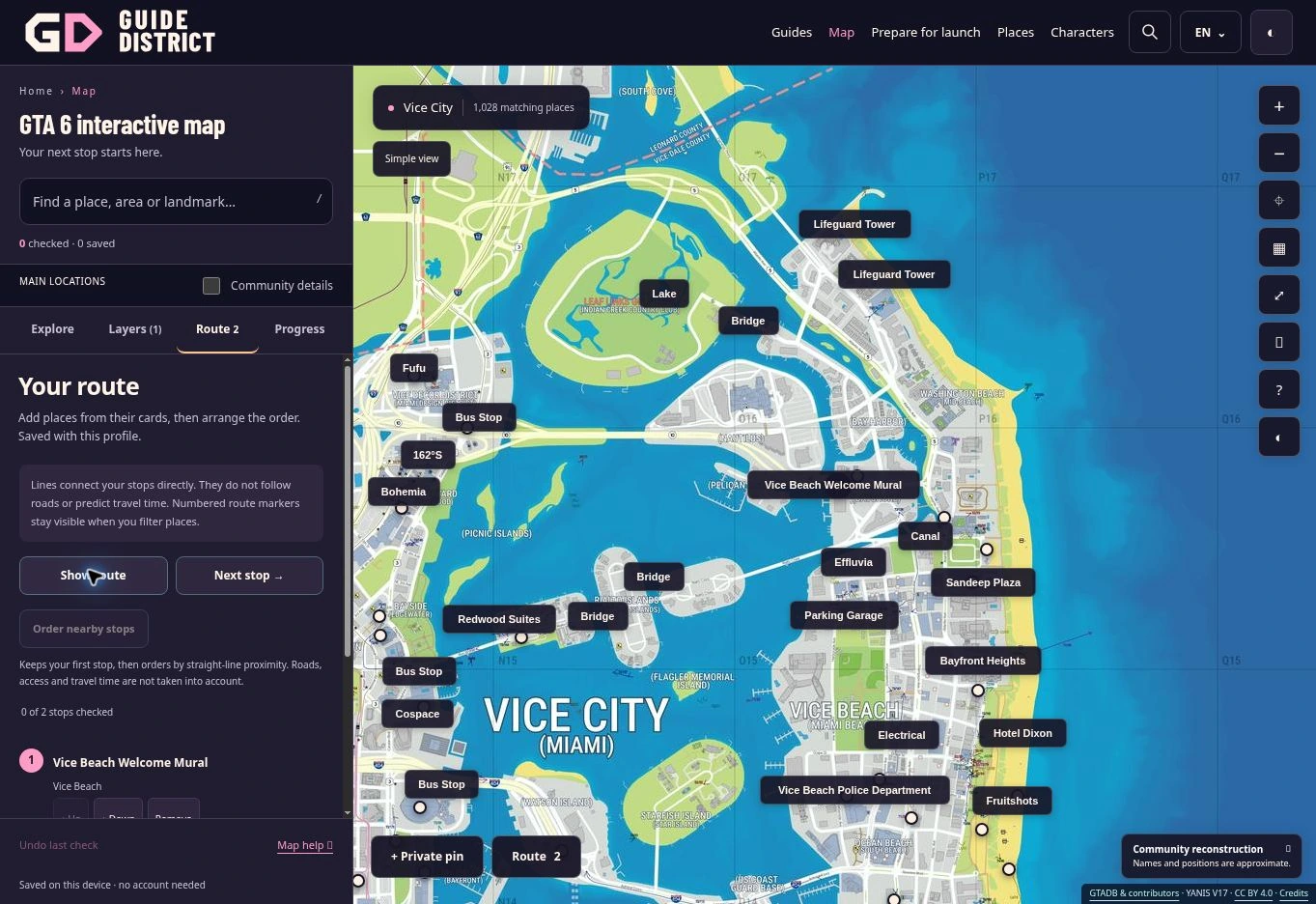
Show route fits the map around the available stops. Next stop → opens the first unchecked stop in your chosen order; it does not select the closest one. Mark Checked on my map when you have finished your own review, then return to My route for the next stop.
Read the lines correctly
The dashed lines join coordinates directly. A line crossing water or a building does not establish a road, access point, transport service or travel time. Positions are estimates too: read the accuracy guide before interpreting a route as a real journey.
Numbered route markers remain available on the map when other filters hide those places from search results. This is intentional. If the list and map seem different, check your route before changing your search. A route holds up to 100 distinct stops.
Edit without losing your other work
Remove deletes a stop from the route. Clear route… asks for confirmation and empties the ordered list while keeping favourites, notes, checkmarks and private pins. Neither action changes a game save.
Each profile has its own route. Download a backup before transferring it. If an imported stop says Place no longer in this catalogue, its identifier is retained, but the map cannot open that missing entry. Keep a backup before deciding whether to remove it.
Build a route from your results
Narrow a search or category, then choose Add these results to route. Unchecked points with a map position are added without duplicates. If the combined route exceeds 100 stops, nothing is added: narrow the filters first.
Order nearby stops keeps your first stop and arranges the rest by straight-line proximity. It does not account for roads, bridges, entrances, obstacles or travel time. Undo reordering restores the previous order. Hidden or unavailable stops stay saved but are not plotted; lines break around those stops.