

GTA VI / GUIDEDISTRICT
GTA 6 languages: voices and text
On this page
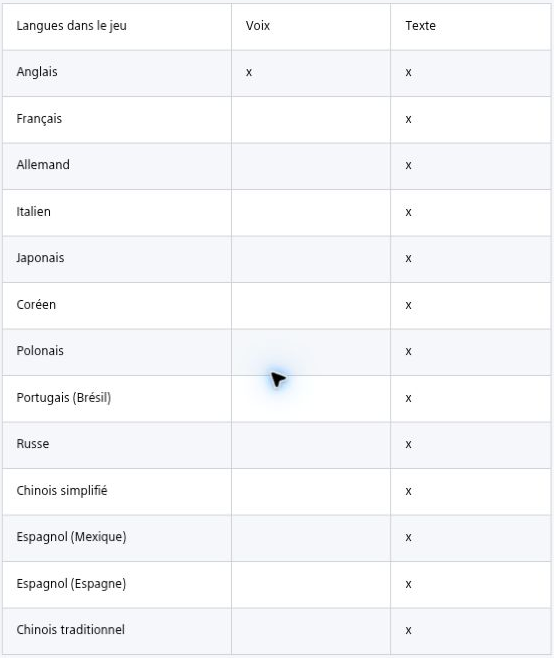
PlayStation’s GTA 6 support page lists English voices and text in 13 languages. French, German, Spanish and Brazilian Portuguese are text options, not confirmed dubbed audio. The exact in-game language menu has not been verified here.
Voices and text are different options
An English voice track means spoken dialogue remains in English. Text support does not promise a translated voice track. When choosing a copy for someone else, ask whether they need translated text or spoken dialogue.
The official table groups written content under “Text”; it does not detail every subtitle, interface or accessibility setting. This source is PlayStation support. Check the Microsoft product listing separately for the Xbox version.
Text languages listed for PS5
The PlayStation support table lists the following 13 languages for written text. English is the only language marked as supported for voice.
- English
- French
- German
- Italian
- Japanese
- Korean
- Polish
- Portuguese (Brazil)
- Russian
- Simplified Chinese
- Spanish (Mexico)
- Spanish (Spain)
- Traditional Chinese
Can you change the language now?
This guide has not verified the released game’s menu. It therefore does not give a GTA 5 menu path as if it were a tested GTA 6 instruction. Language-selection steps will be added after checking the actual game or a dedicated official GTA 6 article.
Before buying, open the store listing for your exact platform and region, check its language fields and compare them with the language you need. A foreign-language box or regional code is not proof that a particular dub is included.
The GuideDistrict language selector only changes this website. It does not change your console, your purchased game or your account region. See editions and regional codes before purchasing an imported copy.
Sources
Useful next steps
Compare GTA 6 Standard and Ultimate, preorder bonuses, the code-in-box version and regional code restrictions before buying.
The announced GTA 6 release date and console platforms, with the difference between release, preloading and an unannounced PC schedule.